HOW TO UPLOAD DOCs
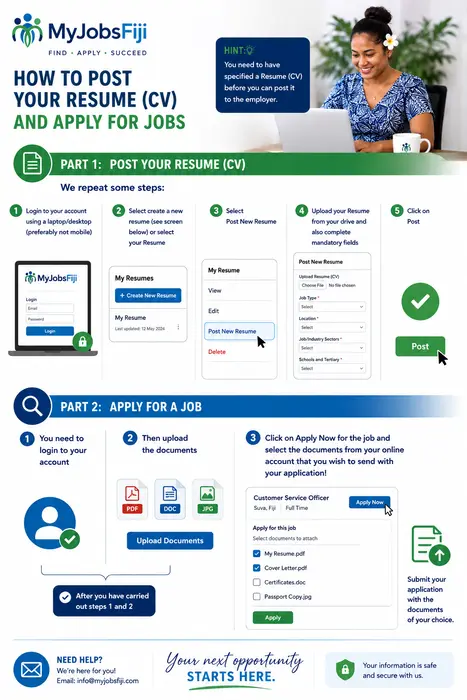
Before You Apply – A Helpful Tip
Before you can send your application to an employer, you must first upload and post your Resume (CV) to your MyJobsFiji account.
Let's walk through the steps:
Step 1
Log in to your MyJobsFiji account using a laptop or desktop computer (recommended for the best experience).
Step 2
Select "Create New Resume" or choose an existing resume from your account.
Step 3
Click "Post New Resume."
Step 4
Upload your Resume (CV) from your computer and complete all mandatory fields, including:
- Job Type
- Location
- Job/Industry Sector
- Secondary School
- Tertiary Education
Step 5
Click "Post" to save your resume to your account.
Now You're Ready to Apply for Jobs!
Step 1
Log in to your MyJobsFiji account.
Step 2
Upload any supporting documents you may wish to send with your application, such as:
- Cover Letter
- Certificates
- References
- Passport or ID (if requested)
- Other relevant documents
Step 3
Find the job you're interested in and click "Apply Now."
You will then be able to select which documents from your MyJobsFiji account you would like to send to the employer.
Once selected, submit your application and you're done!
Tip: Keep your resume and documents updated so you're always ready to apply when the right opportunity comes along.